
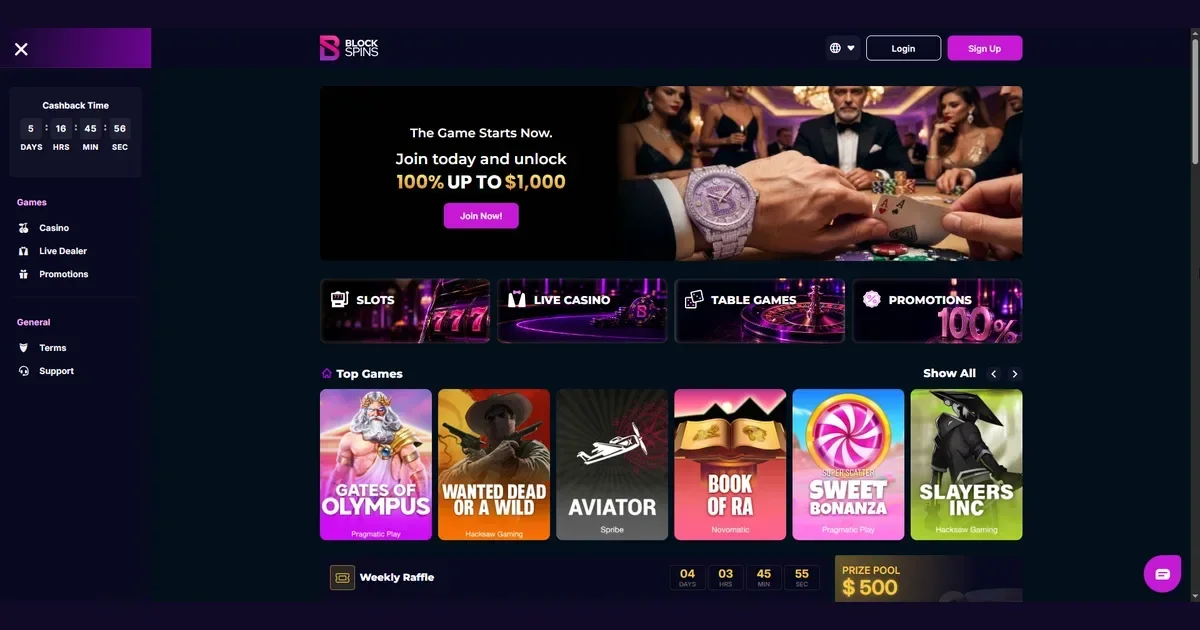
Blockspins runs entirely in a mobile browser — you open the site, log in, and play. There is no application to download, no app store involved, and no installation step. The platform is built to work on phones and tablets through Chrome, Safari, Firefox or any modern browser, and that is how UK players access it from a handheld device.
This page explains what you can do from a phone, what the experience actually looks like day to day, and where the mobile version differs from sitting at a desk.
How mobile access works
You type blockspins.com into your mobile browser and the site loads. The layout adjusts to the screen width automatically, with no separate mobile domain and no redirect. Your account works the same way it does on a laptop — same balance, same game history, same active bonus if you have one running.
We found no mention of a native iOS or Android application in the operator's published material. Browser access is what Blockspins provides, and it works on any device that runs a current browser.
What you can do from a phone
The mobile site carries the full casino library. Slots, live dealer tables, and the table games section all load on a phone. The sportsbook is accessible as well, with the same markets and live betting options desktop users see.
Registration and account setup work from a handheld device. You can create an account, make a deposit, activate the 100% welcome bonus up to 1,000 USD equivalent, and start playing without switching to a computer.
Deposits and withdrawals go through on mobile. The cashier lists the same cryptocurrency payment methods the desktop version does. The operator does not enforce a minimum deposit amount, and the 7,000 USD equivalent 24-hour withdrawal cap applies regardless of which device you submit the request from.
Customer support is reachable from a phone. The live chat button appears in the mobile layout, and you can send an email to the support address from any device.
Day-to-day use on a small screen
Most slots and live tables scale down without losing functionality. Touch controls replace mouse clicks — you tap to spin, to place a bet, to open a menu. Games that rely on detailed graphics or small UI elements can feel cramped on a phone smaller than six inches, but the mechanics stay intact.
The account menu collapses into a hamburger icon on narrower screens. Reaching transaction history, bonus status, or account settings takes an extra tap compared with the desktop layout, where those links sit visible in a sidebar.
Search and filtering tools work, though typing a game title on a touchscreen keyboard is slower than on a physical one. The operator does not publish the exact game count or provider list, so we cannot confirm how many titles load on mobile versus desktop — but the categories we tested (slots, live casino, table games) all appeared, and individual games launched without throwing compatibility warnings.
Known limits and trade-offs
Browser-based play means no push notifications. If a bonus is about to expire or a withdrawal is approved, you will not get an alert unless you open the site and check manually.
Multi-table tournament play and side-by-side bet tracking are harder on a single small screen. The sportsbook's ComboBoost feature, which scales a multiplier up to 2.0× for accumulator bets with 20 selections, requires building a betslip with many legs — scrolling through that list on a phone is workable but slower than scanning it on a larger display.
Battery drain is a real consideration. Live dealer streams use more power than static slot games, and a cryptocurrency casino keeps a WebSocket connection open for balance updates. An hour of continuous play will pull your charge down noticeably faster than browsing or messaging.
Data usage matters if you are not on Wi-Fi. Live video tables consume more bandwidth than RNG games. The operator's provably fair technology runs client-side verification in the browser, which adds a small amount of JavaScript execution on every spin or hand — not enough to slow a modern phone, but worth knowing if you are on a metered connection.
Session management on a device you carry everywhere
Playing from a phone makes it easier to chase losses in a moment of frustration, because the site is always in your pocket. The self-exclusion policy Blockspins offers — definite, indefinite, or permanent account closure via email to support — is available from any device, but the request itself requires you to sit down and write it out rather than clicking a one-tap control in the app.
Setting deposit limits or session time reminders is harder when the responsible gambling tools are not prominently surfaced in the mobile layout. We found no published detail on where those controls live on a phone screen, which is a gap worth noting before you start playing on the move.
What to check before you play
Open the site on your actual device and test a game in the category you plan to play most. Slots generally work well on any screen size; live dealer tables with chat windows and multiple camera angles can feel cramped on a phone smaller than 5.5 inches.
Check your browser's cookie and JavaScript settings. The site needs both enabled to maintain your login session and to load games. Blocking third-party scripts will break some provider integrations.
Confirm your mobile network allows gambling traffic. Some UK carriers and workplace Wi-Fi networks filter casino domains by default, and you will see a connection error rather than a login page if that is the case.
Verify that the cashier works from your phone before you deposit a large amount. Test a small deposit first — the operator's 14-day refund policy for unused Blockspins Balance covers purchases that have not been wagered, so you have a window to reverse a payment if the mobile experience does not meet your needs.
Browser choice and clearing cache
Chrome and Safari handle the site without issues in our testing. Firefox works as well, though some users report that aggressive tracking protection can interfere with game loading if the provider's CDN is flagged.
If a game freezes or the balance does not update after a bet, clear your browser cache and reload the page. The operator's terms note that negative account balances can occur in rare cases, and the site reserves the right to void pending bets to correct them — that clause exists partly to cover client-side state mismatches, which happen more often on mobile than desktop.
Protecting minors on a shared device
The operator requires all users to be 18 years or older (18+). A phone or tablet shared with a minor is a real scenario. iOS Screen Time and Android Digital Wellbeing both allow you to block gambling sites by category, and third-party parental controls such as Net Nanny or Qustodio add an extra layer.
Blockspins markets itself as a "No KYC Crypto Casino" and states that no verification is required, which means there is no document gate stopping an underage person from creating an account if they have access to cryptocurrency. The safest approach is to use device-level blocking rather than relying on the operator's age check.
Responsible mobile play
Gambling from a phone makes it easier to play impulsively — the site is always within reach, and a bad day can turn into a string of unplanned deposits faster than it would at home. Set a time limit before you open the site, and stick to it even when a session is going well.
If gambling stops feeling like entertainment, free and confidential support is available in the UK from BeGambleAware at begambleaware.org and through the National Gambling Helpline on 0808 8020 133, open 24 hours a day. GamStop provides free self-exclusion across licensed operators, and blocking software such as Gamban or BetBlocker works on mobile devices.
For questions about the mobile site or anything else covered on this portal, contact the editorial team at [email protected].
This site is for players aged 18 and over (18+) only. We want your play to stay enjoyable — for free, confidential support, visit BeGambleAware.org.